Sending email to multiple recipients (CC)
Deliver every contact form enquiry to more than one inbox by adding Cc lines to the Additional headers of your Contact Form 7 mail template.
1 minute read
-
1
Edit the contact form
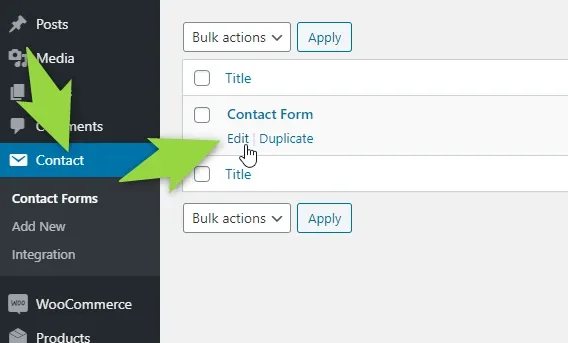
In the WordPress sidebar go to Contact → Contact Forms and click Edit under your contact form.
-
2
Add the extra addresses
On the Mail tab, put your one main email address into the To field and add the other addresses to Additional headers, one per line:
Cc: address2@domain.comandCc: address3@domain.com.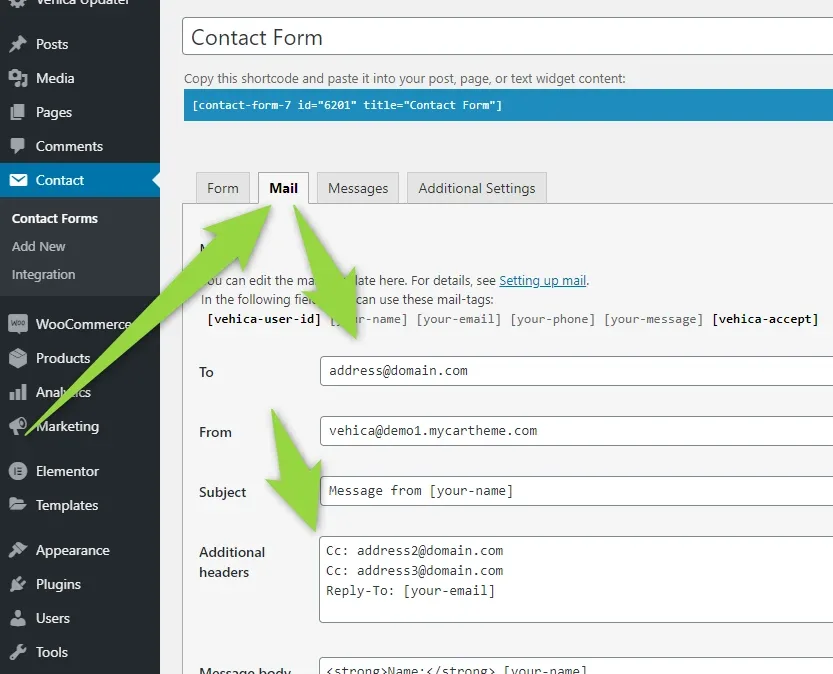
-
3
Save the contact form

Now, when someone fills in the contact form, the email will go to all 3 email addresses.
Ask the people who build Vehica
We answer by email from support@tangiblewp.com. With Premium Support, we also fix your site when something breaks.
We can also run your site for you, or build a new one.
Was this guide helpful?