
How to fix: Map not working correctly
1 minute read
If you have any problem with Google Maps, please open console to see error message. You can do it e.g. by clicking F12 in Chrome:
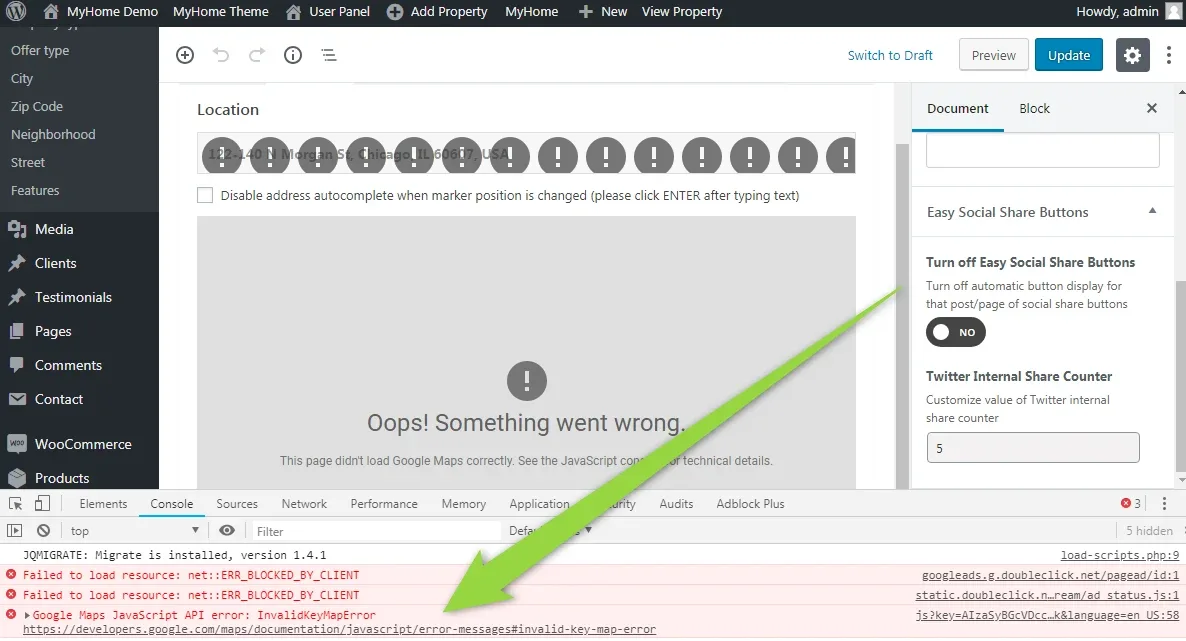
In this case the added key is not valid. Please create new one this way:
The most popular problem with map is that added key do not have all Googlem Maps API key activated. Please make sure you added all
- Maps JavaScript API
- Geocoding API
- Places API
Ask the people who build MyHome WPBakery
We answer by email from support@tangiblewp.com. With Premium Support, we also fix your site when something breaks.
We can also run your site for you, or build a new one.
Was this guide helpful?