
How To Use Multi Column Submenu?
1 minute read
-
1
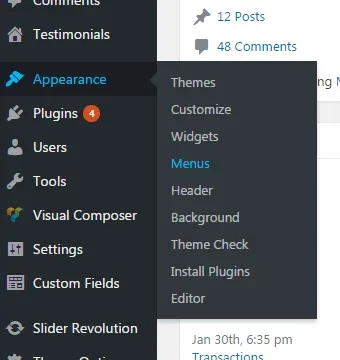
Hover over the "Appearance" tab in the left sidebar and click "Menus"
-
2
Create your menu structure
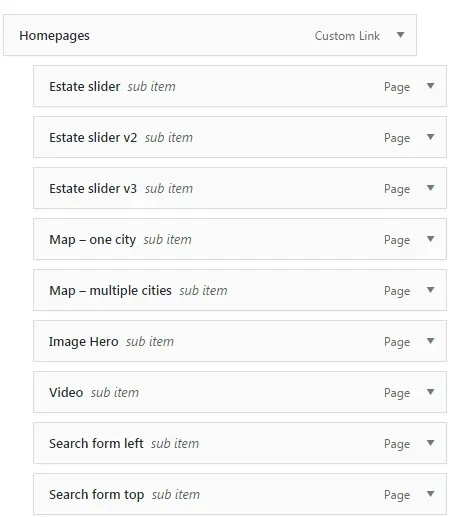
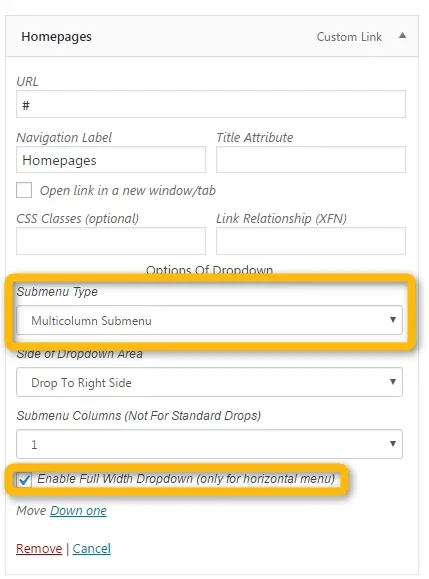
- 3 Customize the parent menu item:
- Submenu type: Multicolumn Submenu
- Enable Full Width Dropdown
4. Click the “Save Menu” button
Ask the people who build MyHome WPBakery
We answer by email from support@tangiblewp.com. With Premium Support, we also fix your site when something breaks.
We can also run your site for you, or build a new one.
Was this guide helpful?