
How To Use Transparent Menu?
1 minute read
Overview
-
1
Transparent menu:

-
2
Transparent menu option has no influence on top bar color (look at example below):

-
3
When you use the transparent menu option, the submenus will have a little bit darker background than standard submenus
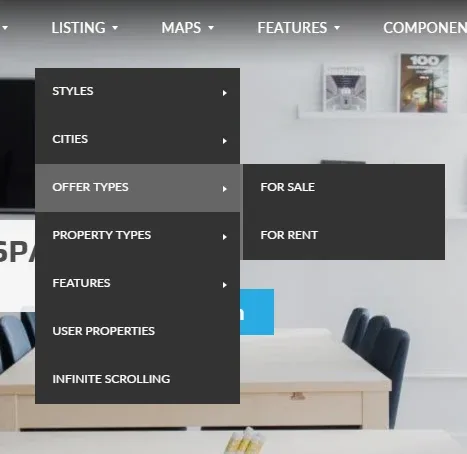
Setting transparent menu:
-
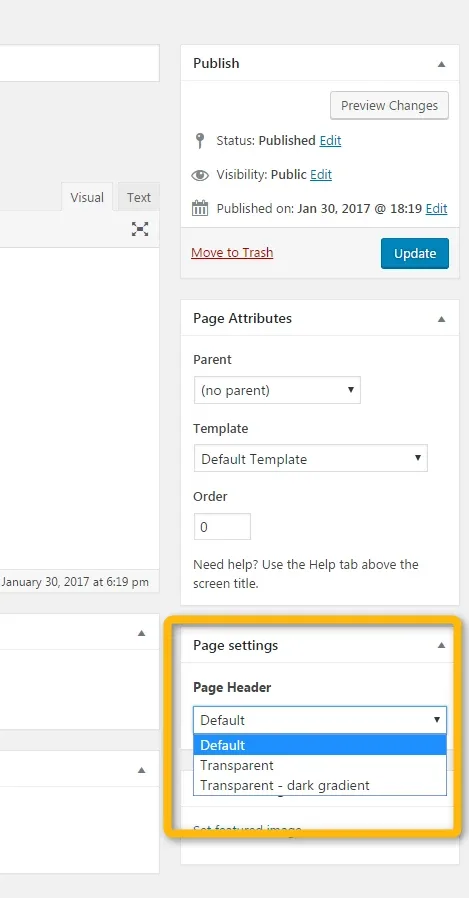
1
Edit a page

-
2
Change the page header for "transparent"
-
3
If you prefer, you can choose a "Transparent - dark gradient" option instead of the "transparent" option. It ads a dark gradient background (picture below) to the menu so it's white fonts are more visible

- 4 Click the "Update" button
Ask the people who build MyHome WPBakery
We answer by email from support@tangiblewp.com. With Premium Support, we also fix your site when something breaks.
We can also run your site for you, or build a new one.
Was this guide helpful?